 DayPilot
Released on January 21, 2008.
Main features
This release introduces a brand new control, DayPilot Dynamic Scheduler. It is based on DayPilot Scheduler and it introduces several revolutionary features:
- On-demand event loading
- Double scrollbar (vertical and horizontal)
- Hiding non-business hours (the timeline can be discontinuous)
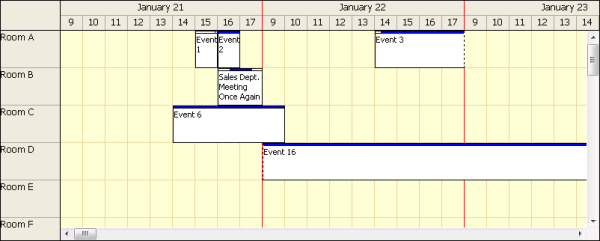
The standard features that are available in this first release:
- Event moving (the moving shadow intelligently handles the hidden noń-business hours)
- Event resizing (the resizing shadow intelligently handles the hidden noń-business hours)
- Event clicking
- Context menu
- Event customization (BeforeEventRender event)
- It keeps the scrolling position after PostBack (or partial PostBack inside an UpdatePanel)
This first release has a few limitations:
- No header customization (BeforeHeaderRender event is not available)
- No cell customization (BeforeCellRender event is not available)
- No time range selecting (TimeRangeSelected event is not available)
- Width can't be specified in percent, only in pixels
- Simplified design-time preview in Visual Studio
- Initial scrollbar postion can't be changed.
- The red color of the line indicating the time break is hardcoded.
- refreshCallBack() client-side method is not available.
The first set of the missing features should be available in the next release (4.5).
There is also one difference that will stay in the future versions as well:
- It draws the concurrent events in the same row (DayPilotScheduler extends the row height and shows one event per line).
(F49) On-demand event loading (DayPilot Dynamic Scheduler)
The original DayPilot Scheduler allows showing a long time range (one year with one cell per day is not a problem). However, it renders all the events at once. In case that you have hundreds of events it will render very slowly and the callbacks and postbacks will take a lot of time.
DayPilot Dynamic Scheduler offers a major improvement: It loads only the events that belong to the current view port (only a limited time range and a limited set of resources).
The advantages are obvious:
- You can show many more resources (adding more resources won't slow down the control)
- The control renders quickly with a full schedule as well.
When you scroll down or right, it sends a request for a new set of events to the server (Scroll event) and updates quickly. The background cells are rendered after the event set is loaded. The white background area indicates that the events were not loaded yet.
When binding the data source (during the initial loading, during scrolling or after an update) you can get the information about the visible area using ViewPort property:
DateTime firstVisibleDate = DynamicScheduler1.ViewPort.Start;
DateTime lastVisibleDate = DynamicScheduler1.ViewPort.End;
List<string> visibleResourcesIDs = DynamicScheduler1.ViewPort.Resources;
You should use the ViewPort property to limit the SQL query.
(F53) Vertical scrollbar (DayPilot Dynamic Scheduler)
Because DayPilot Dynamic Scheduler can show many more resources, it was necessary to add a vertical scrollbar. Both scrollbars are synchronized with the headers.
The vertical scrollbar is turned on automatically: If the specified Height is enough to show all resources, the vertical scrollbar will be added.
(F57) Hiding non-business hours (DayPilot Dynamic Scheduler)
It is possible to show the timeline without the non-business hours (e.g. weekends, 5pm-9am - depending on the resolution). Set the ShowNonBusiness property to false:
ShowNonBusiness="false"
Other fixes and improvements
.NET Framework 3.5 compatiblity
- DayPilot now properly detects the AJAX Extensions version 3.5.0.0. from .NET Framework 3.5. That means it will work inside an UpdatePanel properly.
Visual Studio 2008 design-time preview
- The design-time preview of DayPilot Calendar and DayPilot Scheduler in Visual Studio 2008 is improved (the previous versions were rendering the time cells improperly).
UpdatePanel and initial Visible="false" scenario fixed
- If you put a previous version inside an UpdatePanel, set the initial visibility to false and than changed to Visible="true" using partial PostBack, the controls (DayPilot Scheduler and DayPilot Calendar) were rendering improperly.
- The fix works for this scenario as well: http://forums.daypilot.org/Topic.aspx/131/calendar_is_not_work_when_using_in_the_first_tab_control_ver
DayPilot Month: InnerHTML fixed
- Changing e.InnerHTML in BeforeEventRender had no effect: It was always overwritten by the standard e.Text.
DayPilot Month: Month names in negative time zone offset
- The month names were moved one month back when the client was in a time zone with a negative offset.
DayPilot Month: ShowEventStartEnd property
- It's possible to turn off the starting and ending times in event boxes by setting ShowEventStartEnd="false"