 DayPilot
Released on January 30, 2009 (build 1672).
Features
(F) Faster loading and scrolling for large date ranges (DayPilot Scheduler)
The loading and scrolling was improved significantly in DayPilot Scheduler.
- Cache improvements: The Scheduler preloads plus one and minus one screen horizontally and full height vertically.
- Scrolling speed: The synchronization of the cells and the time header is improved (especially in Firefox 3).
- Faster initial loading: The loading time reduced by up to 60%. For example the time needed for full refresh of the year view was reduced from 670 ms to 270 ms.
- Less memory: The Scheduler now runs with smaller memory footprint.
The new rendering mode is used automatically if all cells in a column have the same color. If there is one column with one cell different from the others in that column, it falls back to the original rendering mode.
Status: Implemented
(F) Option to hide weekends (DayPilot Month)
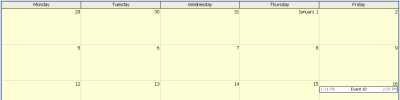
DayPilot Month now support showing 5-day work week.
Setup:
- Set ShowWeekend="false".
Behavior is adjusted accordingly:
- Long events wrap automatically during move/resize.
Demo:
Status: Implemented
(F) Fast event filtering example (DayPilot Month, DayPilot Scheduler)
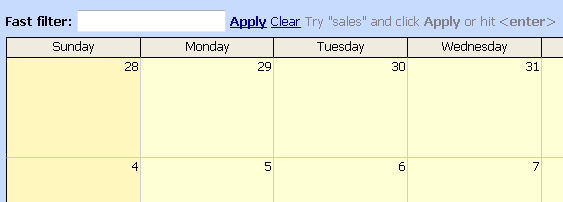
See also:
Status: Implemented
(F) ClientState property (DayPilot Scheduler, DayPilot Month, DayPilot Calendar, DayPilot Dynamic Scheduler)
On the client side, you can save the state of all helping controls (typically all kinds of filters) to .clientState field.
See also:
Status: Implemented
(F) Resources hierarchy (DayPilot Scheduler)
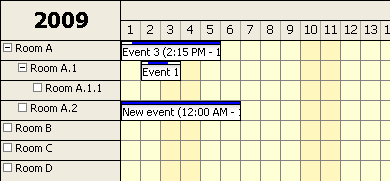
DayPilot Scheduler now supports an expandable tree of resources.
Documentation
Demo
Status: Implemented
(F) Event background image (DayPilot Scheduler, DayPilot Calendar)
It's now possible to specify a background image for events in DayPilot Calendar and DayPilot Scheduler.
It's useful for:
- Creating 3D effects using gradient fill (see the demo).
- Differentiate many types of events (where there are not enough plain colors).
DayPilot Calendar example:
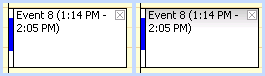
DayPilot Scheduler example:
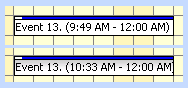
Example:
protected void DayPilotScheduler1_BeforeEventRender(object sender, DayPilot.Web.Ui.Events.BeforeEventRenderEventArgs e)
{
   e.BackgroundImage = "../Media/gradient_dps.jpg";
   e.BackgroundRepeat = "repeat-x";
}
Status: Implemented
(F) Turning off snap-to-grid behavior for moving/resizing (DayPilot Scheduler)
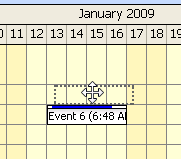
By default, event boxes are snapped to the background time cell grid during moving and resizing in DayPilot Scheduler. It's now possible to move and resize the events by free hand.
Setup:
- Set SnapToGrid="false".
Notes:
- The actual position is calculated based on the number of pixels per cell (CellWidth).
- It's recommended to set UseEventBoxes="Never" to prevent confusion (the moving/resizing shadow width always corresponds to the event box width).
Status: Implemented
Minor improvements and bug fixes
- Forum 632 (improvement): It's possible to specify CssClass per event in BeforeEventRender event handler.
- Bug: The space above and below the duration bar is now always white (it doesn't change to event background color like in previous versions).
- Forum 632 (improvement): It's possible to specify CssClass per event in BeforeEventRender event handler.
- Forum 642 (bug): The foreground color specified in HeaderFontColor is now properly applied to time headers as well.
- Case 1932 (bug): Separators now get updated during Update(CallBackUpdateType.Full).
- Case 1902 (bug): External drag&drop no longer causing errors when DataTagFields are defined.
- Bug: "__pendingCallbacks[i] is undefined" error no longer appears during Update(CallBackUpdateType.Full).
- Bug: SnapToGrid="true" is now the default mode (it was hardcoded by mistake in release 5.1 SP2).
- Bug: Both resource and time headers and the main scheduling area is now filled with header background color (HourNameBackColor). No background color was used if the headers were too short.
- Bug: The space before and after the duration bar is now always white (it doesn't change to event background color like in previous versions).
- Forum 620 (improvement): AfterEventRender client-side event added.
- Bug: Values of VisibleStart and VisibleEnd are no longer switched.
- Bug: Text editing cursor replaced by arrow for day headers.
- Forum 620 (improvement): AfterEventRender client-side event added.