 DayPilot
Release date: April 15, 2013 (build 2834)
Touch Devices Support (iOS, Android)

Scheduler
- Event moving (press and drag)
- Event click (tap)
- Time range selecting (press and drag or tap)
Calendar
- Event moving (press and drag)
- Event click (tap)
- Time range selecting (press and drag or tap)
Month
- Event moving (press and drag)
- Event click (tap)
- Time range selecting (press and drag or tap)
Tested with iOS 6 (iPad, iPhone, iPod Touch) and Android (4+) on tablets and smart phones.
Transparent Theme (Calendar)
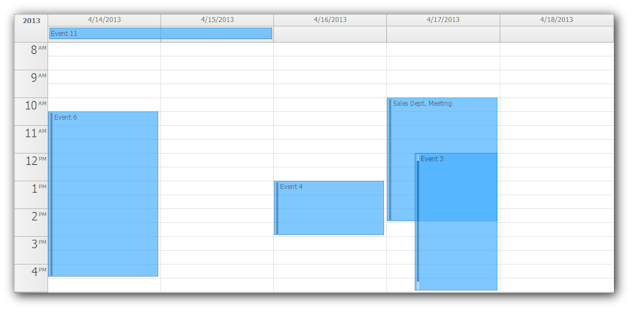
Demo:
- Transparent Theme Demo (Calendar)
Transparent Theme (Month)
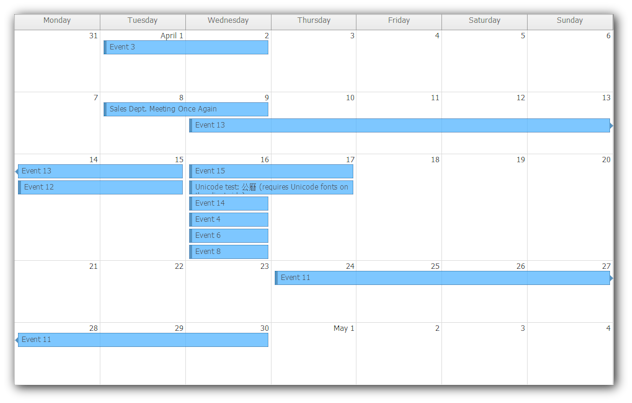
Demo:
- Transparent Theme Demo (Monthly Calendar)
Transparent Theme (Scheduler)
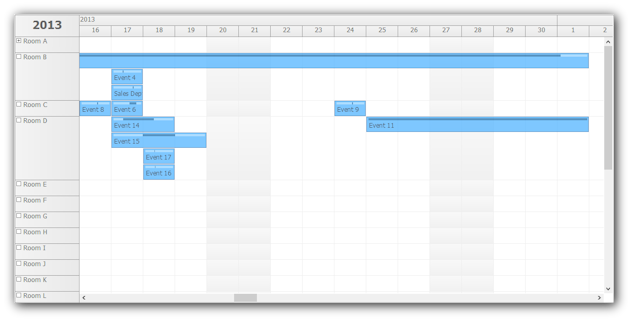
Demo:
- Transparent Theme Demo (Scheduler)
Event "Continue" CSS Classes (Monthly Calendar)
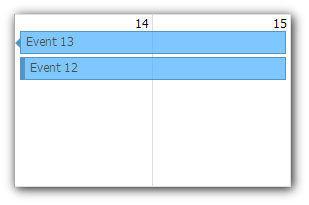
Events that continue in another row or page are marked with _event_continueleft and/or _event_continueright classes.
Demo:
- CSS Continue Classes Demo (Monthly Calendar)
Animated Event Bubble Popup
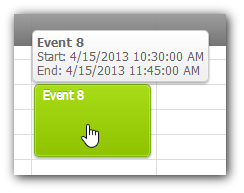
Animated property. Enabled by default. Disables Loading label.
Mono Support (Windows and Linux)
See Also:
Client-Side Event API (Calendar)
- events.add()
- events.remove()
- events.update()
- events.find()
- events.findRecurrent()
Client-Side Event API (Month)
- events.add()
- events.remove()
- events.update()
- events.find()
- events.findRecurrent()
Duration Bar Support in CssOnly Mode (Calendar)
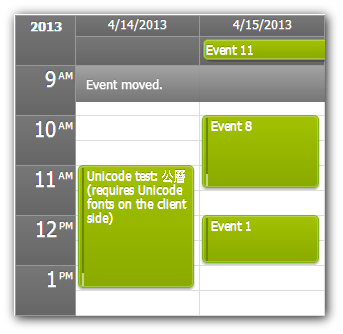
DurationBarVisible="true"
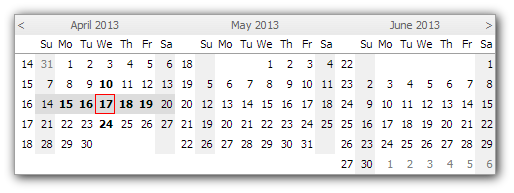
Navigator Orientation (Horizontal/Vertical)
Orientation="Vertical"
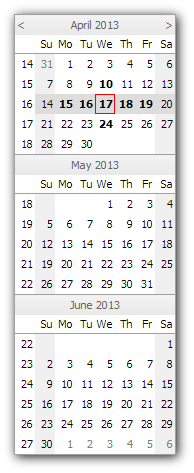
Orientation="Horizontal"
Notify Event Model (Calendar)
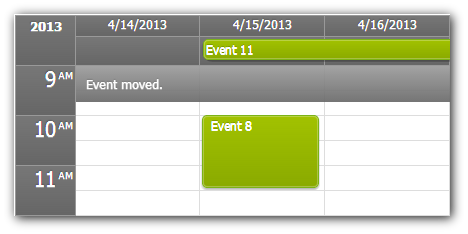
The "Notify" event model updates the client first and then notifies the server about the change. Compare this model with the traditional "Refresh" model where the change is first sent to the server, the server returns and updated event set and the client is refreshed.
The Notify model can be enabled for event moving and resizing using the following properties:
EventMoveHandling="Notify"
EventResizeHandling="Notify"
You can make custom changes using the events API:
var e = new DayPilot.Event({start:new DayPilot.Date(), end:(new DayPilot.Date()).addHours(5), value: DayPilot.guid(), text: "New Event"});
dpc.events.add(e).notify();
Multiple changes can be queued and submitted in batches:
var e;
e = new DayPilot.Event({start:new DayPilot.Date(), end:(new DayPilot.Date()).addHours(5), value: DayPilot.guid(), text: "New Event"});
dpc.events.add(e).queue();
e = new DayPilot.Event({start:new DayPilot.Date(), end:(new DayPilot.Date()).addHours(5), value: DayPilot.guid(), text: "New Event"});
dpc.events.add(e).queue();

dpc.queue.notify();
The notify() function (which you can execute on a single action or on the queue) will fire Notify event on the server side:
protected void DayPilotCalendar1_Notify(object sender, DayPilot.Web.Ui.Events.Calendar.NotifyEventArgs e)
{
	foreach(DayPilotEventArgs ea in e.Queue)
	{
		if (ea is EventAddEventArgs)
		{
			EventAddEventArgs em = (EventAddEventArgs)ea;
			DayPilotCalendar1_EventAdd(sender, em);

		}
		else if (ea is EventMoveEventArgs)
		{
			EventMoveEventArgs em = (EventMoveEventArgs) ea;
			DayPilotCalendar1_EventMove(sender, em);

		}
		else if (ea is EventRemoveEventArgs)
		{
			EventRemoveEventArgs em = (EventRemoveEventArgs) ea;
			DayPilotCalendar1_EventRemove(sender, em);
		}
		else if (ea is EventUpdateEventArgs)
		{
			DayPilotCalendar1_EventUpdate(sender, (EventUpdateEventArgs) ea);
		}
	}

	string msg = String.Format("Queue saved ({0} actions).", e.Queue.Count);
	DayPilotCalendar1.UpdateWithMessage(msg);
}
You can also set the default Notify behavior (for EventResizeHandling="Notify" and EventMoveHandling="Notify") using NotifyCommit property.
NotifyCommit="Queue"
The default value is "Immediate". It will fire the EventResize or EventMove event immediately.
If you set the value to "Queue" it will not fire any server-side event. Instead, it will be added to the queue that can be submitted using dpm.queue.notify() method.
- Notify Event Model Demo (Calendar)
Notify Event Model (Month)
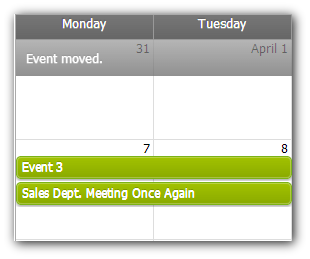
The "Notify" event model updates the client first and then notifies the server about the change. Compare this model with the traditional "Refresh" model where the change is first sent to the server, the server returns and updated event set and the client is refreshed.
The Notify model can be enabled for event moving and resizing using the following properties:
EventMoveHandling="Notify"
EventResizeHandling="Notify"
You can make custom changes using the events API:
var e = new DayPilot.Event({start:new DayPilot.Date(), end:(new DayPilot.Date()).addHours(5), value: DayPilot.guid(), text: "New Event"});
dpm.events.add(e).notify();
Multiple changes can be queued and submitted in batches:
var e;
e = new DayPilot.Event({start:new DayPilot.Date(), end:(new DayPilot.Date()).addHours(5), value: DayPilot.guid(), text: "New Event"});
dpm.events.add(e).queue();
e = new DayPilot.Event({start:new DayPilot.Date(), end:(new DayPilot.Date()).addHours(5), value: DayPilot.guid(), text: "New Event"});
dpm.events.add(e).queue();

dpm.queue.notify();
The notify() function (which you can execute on a single action or on the queue) will fire Notify event on the server side:
protected void DayPilotMonth1_Notify(object sender, DayPilot.Web.Ui.Events.Month.NotifyEventArgs e)
{
	foreach(DayPilotEventArgs ea in e.Queue)
	{
		if (ea is EventAddEventArgs)
		{
			EventAddEventArgs em = (EventAddEventArgs)ea;
			DayPilotMonth1_EventAdd(sender, em);

		}
		else if (ea is EventMoveEventArgs)
		{
			EventMoveEventArgs em = (EventMoveEventArgs) ea;
			DayPilotMonth1_EventMove(sender, em);

		}
		else if (ea is EventRemoveEventArgs)
		{
			EventRemoveEventArgs em = (EventRemoveEventArgs) ea;
			DayPilotMonth1_EventRemove(sender, em);
		}
		else if (ea is EventUpdateEventArgs)
		{
			DayPilotMonth1_EventUpdate(sender, (EventUpdateEventArgs) ea);
		}
	}

	string msg = String.Format("Queue saved ({0} actions).", e.Queue.Count);
	DayPilotMonth1.UpdateWithMessage(msg);
}
You can also set the default Notify behavior (for EventResizeHandling="Notify" and EventMoveHanglin="Notify") using NotifyCommit property.
NotifyCommit="Queue"
The default value is "Immediate". It will fire the EventResize or EventMove event immediately.
If you set the value to "Queue" it will not fire any server-side event. Instead, it will be added to the queue that can be submitted using dpm.queue.notify() method.
Demo:
- Notify Event Model Demo (Monthly Calendar)
Client-side update (Calendar)
Call update() on the client side to immediately update the calendar after changing the properties. This used to require a server-side request using commandCallBack().
Changing Cell Height (Example)
dpc.cellHeight = 40;
dpc.update();
Client-Side Update (Month)
Call update() on the client side to immediately update the calendar after changing the properties. This used to require a server-side request using commandCallBack().
Hiding Weekends (Example)
dpm.showWeekend = false;
dpm.update();
Client-side update (Scheduler)
Call update() on the client side to immediately update the calendar after changing the properties. This used to require a server-side request using commandCallBack().
Changing a Date (Example)
dps.startDate = "2013-05-01";
dps.update();
Remember to have the events preloaded or to load them manually using events.add().
Hiding Weekends (Example)
dps.showWeekend = false;
dps.update();
Implemented
- Preventing Unspecified Error in IE8 (UpdatePanel). (build 2787)
- Not displaying bubble for objects that were already deleted. (build 2788)
- [Scheduler] Windows 8 Theme fixed (multiple time headers). (build 2791)
- Mono (Windows, Linux, Mac OS X) compatibility. (build 2795)
- [Month] _selected class properly applied in CssOnly mode (missing underscore). (build 2795)
- [Calendar] Client-side event API (build 2796)
- [Month] Client-side event API. (build 2796)
- [Navigator] Windows 8 theme (build 2796)
- [Calendar] Touch support: time range selecting (press and drag), event moving (press and drag), event click (tap) (build 2800)
- [Scheduler] Touch support: event moving (press and drag) (build 2801)
- [Scheduler] Touch support: time range selecting (press and drag) (build 2803)
- [Month] Touch support: event moving (press and drag) (build 2804)
- [Month] Touch support: time range selecting (press and drag) (build 2804)
- [Month] Touch support: event click (tap). (build 2806)
- [Month] Touch support: cell click (tap) (build 2806)
- [Scheduler] Touch support: event click (tap) (build 2806)
- [Scheduler] Touch support: cell click (tap) (build 2806)
- [Month] _event_continueleft class (build 2806)
- [Month] _event_continueright class (build 2806)
- [Scheduler] ResourceCollection marked as serializable. (build 2807)
- [Scheduler] TimeHeaderCollection marked as Serializable. (build 2809)
- Animated bubble popup. (build 2811)
- [Scheduler] SeparatorCollection marked as Serializable. (build 2812)
- [Navigator] Orientation property added (with new Horizontal mode). (build 2813)
- [Calendar] Duration bar support added to CssOnly mode. (build 2815)
- Touch features tested with iOS 6 (iPhone, iPod Touch, iPad), Android 4.0, Android 4.1. (build 2816)
- [Calendar] Notify event (build 2827)
- [Month] Notify event (build 2827)
- [Month] month_white theme implements _event_continueleft and _event_continueright (build 2827)
- [Calendar] Event selecting demo switched to CssOnly mode (build 2827)
- [Month] Event selecting demo switched to CssOnly mode (build 2827)
- [Scheduler] Event selecting demo switched to CssOnly mode (build 2827)
- [Calendar] calendar_white theme implements _selected (build 2827)
- [Month] month_white theme implements _selected (build 2827)
- [Scheduler] scheduler_white theme implements _selected (build 2827)
- [Calendar] Client-side update() implemented. (build 2827)
- [Month] Client-side update() implemented. (build 2827)
- [Scheduler] Client-side update() implemented. (build 2827)
- [Calendar] Bubble not hiding when cursor changed to moving/resizing on event. (build 2830)
- [Scheduler] Bubble not hiding when cursor changed to moving/resizing on event. (build 2830)
- [Navigator] Text selection disabled (IE 9/10, Chrome). (build 2831)
- [Month] Simple Notify demo added. (build 2831)
- [Calendar] Simple Notify demo added. (build 2831)
- [Calendar] Transparent theme added. (build 2832)
- Animated property added to DayPilotBubble. (build 2833)
- [Month] Transparent theme added. (build 2833)
- [Scheduler] Transparent theme added. (build 2833)