 DayPilot
Release date: November 6, 2013 (build 7.6.3002)
Features
Independent Time Headers (Scheduler)
- Time headers are now completely independent of the cell size (CellDuration property)
- Time headers are specified using TimeHeaders property
Example
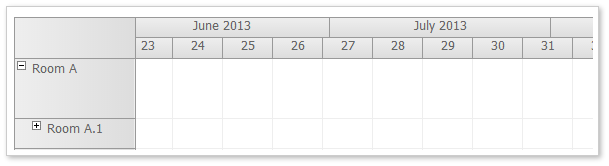
<DayPilot:DayPilotScheduler
Scale="Week"
...
>
<TimeHeaders>
    <DayPilot:TimeHeader GroupBy="Month"  />
    <DayPilot:TimeHeader GroupBy="Week" />
</TimeHeaders>
</DayPilot:DayPilotScheduler>
New properties:
- Scale (extends the current CellDuration property): Minute, Hour, Day, Week, Month, Year, CellDuration, Manual
- Timeline (allows to specify custom time line using individual time cells)
- VisibleStart (gets the visible start, required for custom Timeline when Scale=Manual)
- VisibleEnd (gets the visible end, required for custom Timeline when Scale=Manual)
Obsolete:
- Hiding time columns using BeforeTimeHeaderRender and e.IsColGroup, e.Visible (replaced by IncludeCell event in 7.6 SP1)
- ShowBaseTimeHeader (ignored, replaced by TimeHeaders collection)
Time Header Date Format (Scheduler)
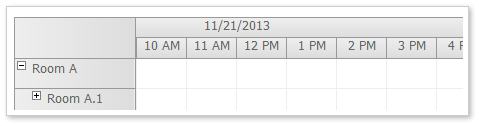
TimeHeaders collection allows you to specify the DateTime format for each time header level separately.
Example:
<DayPilot:DayPilotScheduler
  ...
  >
  <TimeHeaders>
    <DayPilot:TimeHeader GroupBy="Day" Format="d" />
    <DayPilot:TimeHeader GroupBy="Hour" />
  </TimeHeaders>
</DayPilot:DayPilotScheduler>
Custom Timeline (Scheduler)
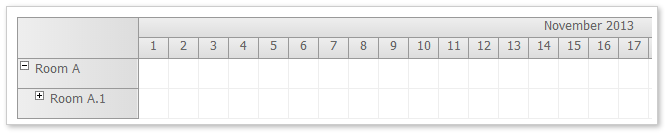
You can build your own timeline from individual cells. Use Timeline collection and set Scale=Manual.
Example
private void CreateTimeline()
{
  DayPilotScheduler1.Timeline.Clear();

  // this month
  DateTime first = new DateTime(DateTime.Today.Year, DateTime.Today.Month, 1);
  int duration = DateTime.DaysInMonth(first.Year, first.Month);
  for (int i = 0; i < duration; i++)
  {
      DateTime start = first.AddDays(i);
      DateTime end = start.AddDays(1);
      DayPilotScheduler1.Timeline.Add(start, end);
  }
}
Non-Linear Timeline (Scheduler)

The time cells in the custom timeline don't have to use the same duration and width.
The following example creates a timeline showing the current month (one day per cell) and three subsequent months (one month per cell).
Example:
private void CreateTimeline()
{
  DayPilotScheduler1.Timeline.Clear();

  // this month
  DateTime first = new DateTime(DateTime.Today.Year, DateTime.Today.Month, 1);
  int duration = DateTime.DaysInMonth(first.Year, first.Month);
  for (int i = 0; i < duration; i++)
  {
      DateTime start = first.AddDays(i);
      DateTime end = start.AddDays(1);
      DayPilotScheduler1.Timeline.Add(start, end);
  }

  // three additional months
  first = first.AddDays(duration);
  for (int i = 0; i < 3; i++)
  {
      DateTime start = first.AddMonths(i);
      DateTime end = start.AddMonths(1);
      DayPilotScheduler1.Timeline.Add(start, end, 100);
  }
}
Month Cell Duration (Scheduler)
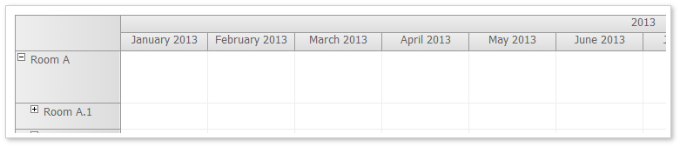
It is possible to display one month per cell.
<DayPilot:DayPilotScheduler
  Scale="Week"
  ...
  >
  <TimeHeaders>
      <DayPilot:TimeHeader GroupBy="Month"  />
      <DayPilot:TimeHeader GroupBy="Week" />
  </TimeHeaders>
</DayPilot:DayPilotScheduler>
Year Cell Duration (Scheduler)
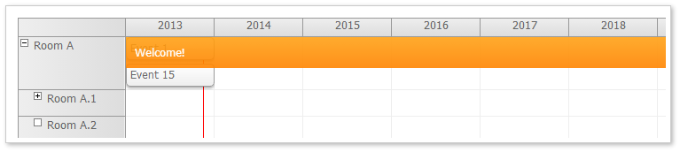
It is possible to display one year per cell.
<DayPilot:DayPilotScheduler
  Scale="Year"
  ...
  >
  <TimeHeaders>
      <DayPilot:TimeHeader GroupBy="Year" />
  </TimeHeaders>
</DayPilot:DayPilotScheduler>
Grid Rendering Optimizations (Scheduler)
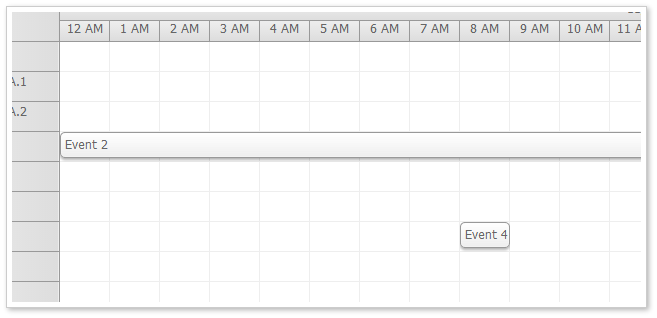
1. DynamicEventRenderingCacheSweeping and DynamicEventRenderingCacheSize properties work properly. When event cache sweeping is enabled (it is disabled by default) the events that are out of range are deleted (keeping only the number specified using DynamicEventRenderingCacheSize).
2. The same functionality is available for background cells. At this moment it is enabled by default and the cache size is set to 0 (i.e. no invisible recent cells are kept when scrolling).
3. It is possible not to render the background cells that don't have any custom properties specified (such as background color, css, html). This option is not accessible through ASP.NET properties at this moment (only using JavaScript).
Improvements
- [Calendar] Calendar: Fixing CSS float issues (left indent). Scheduler: Fixing CSS float issues (hidden resources). (build 2984)
- [Scheduler] Calendar: Fixing CSS float issues (left indent). Scheduler: Fixing CSS float issues (hidden resources). (build 2984)
- Upgraded to Visual Studio 2010. (build 2987)
- [Calendar] Calendar: Using vertical-align: top for time header (Y axis). (build 2989)
- [Calendar] Calendar, Scheduler, Month: DoubleClickTimeout property added (default value is 300). (build 2992)
- [Scheduler] Calendar, Scheduler, Month: DoubleClickTimeout property added (default value is 300). (build 2992)
- [Month] Calendar, Scheduler, Month: DoubleClickTimeout property added (default value is 300). (build 2992)
- [Scheduler] Scheduler: Scale demos added. (build 2999)
- [Scheduler] Format added to time header spec (TimeHeaders collection) (build 3001)
Fixes
- Bubble: Activation fixed (when moving mouse to another event). (build 2990)
- Export time header fixed. (build 2991)
- Infinite loop in header GroupBy="Cell" fixed. (build 2993)
- [Scheduler] Scheduler: scheduler_white and scheduler_green CSS themes fixed to allow EventHeight changes. (build 2998)
- [Scheduler] Row header columns fixed (IE8) (build 3000)